


Product / All features / Portal
Portal
Centralize information from various applications, diverse content, and links to internal systems in one place, making information easier to find and access. You can also create and display news and announcements directly on the portal page.


Create a Portal and Share Information Across the Company
Create flexible portals for each department, team, or project, and organize company news, announcements, and important information in one place. This allows employees to quickly access the information they need from a centralized portal.
The Rich Text Editor allows you to easily upload and insert images and videos without any HTML knowledge. You can quickly create internal information pages, such as company news, announcements, or management portals.

Add menus and icons as needed
Customize portal menus to suit your organization’s needs and add icons for frequently used functions and information. This helps employees quickly find and access different systems from one place without switching between multiple platforms.
Add custom icons to portal menus as needed. For example, you can add a direct link to the payment order system on the management portal for quick and easy access.
Personalized Portal Customization by using tabs
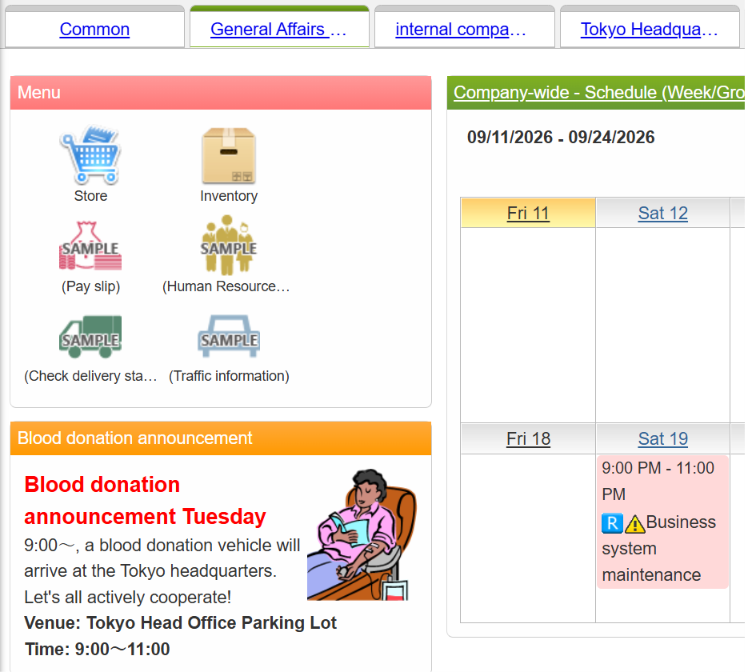
Create multiple portal pages for different purposes, such as internal manuals, general application forms, the latest sales performance, and company newsletters. Organize internal information into tabs, making it easier for employees to find and access the information they need.
You can also make daily work more convenient by displaying your weekly schedule in a larger, easy-to-view format or creating a personal portal where you can quickly check the latest information relevant to you.
Flexibly arrange and customize content
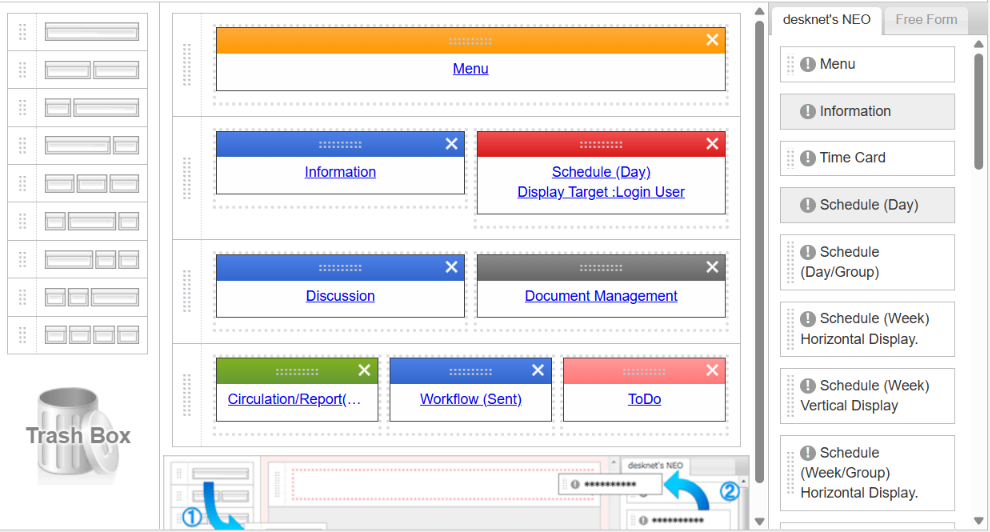
Flexibly arrange and customize various types of content, including news, announcements, calendars, documents, and information from different systems. Adjust the layout to suit the type and amount of information, creating a portal that truly meets your organization’s needs.
The ideal portal layout may vary depending on the amount of information displayed for each function and content type. With the desknet’s NEO Portal, you can divide each row into up to four columns and easily arrange content using simple drag-and-drop functionality.
Product / All features / Portal
Portal
Centralize information from various applications, diverse content, and links to internal systems in one place, making information easier to find and access. You can also create and display news and announcements directly on the portal page.
Create a Portal and Share Information Across the Company
Create flexible portals for each department, team, or project, and organize company news, announcements, and important information in one place. This allows employees to quickly access the information they need from a centralized portal.
The Rich Text Editor allows you to easily upload and insert images and videos without any HTML knowledge. You can quickly create internal information pages, such as company news, announcements, or management portals.
Add menus and icons as needed
Customize portal menus to suit your organization’s needs and add icons for frequently used functions and information. This helps employees quickly find and access different systems from one place without switching between multiple platforms.
Add custom icons to portal menus as needed. For example, you can add a direct link to the payment order system on the management portal for quick and easy access.
Personalized Portal Customization by using tabs
Create multiple portal pages for different purposes, such as internal manuals, general application forms, the latest sales performance, and company newsletters. Organize internal information into tabs, making it easier for employees to find and access the information they need.
You can also make daily work more convenient by displaying your weekly schedule in a larger, easy-to-view format or creating a personal portal where you can quickly check the latest information relevant to you.
Flexibly arrange and customize content
Flexibly arrange and customize various types of content, including news, announcements, calendars, documents, and information from different systems. Adjust the layout to suit the type and amount of information, creating a portal that truly meets your organization’s needs.
The ideal portal layout may vary depending on the amount of information displayed for each function and content type. With the desknet’s NEO Portal, you can divide each row into up to four columns and easily arrange content using simple drag-and-drop functionality.
Product / All features / Portal
Portal
Centralize information from various applications, diverse content, and links to internal systems in one place, making information easier to find and access. You can also create and display news and announcements directly on the portal page.
Create a Portal and Share Information Across the Company
Create flexible portals for each department, team, or project, and organize company news, announcements, and important information in one place. This allows employees to quickly access the information they need from a centralized portal.
The Rich Text Editor allows you to easily upload and insert images and videos without any HTML knowledge. You can quickly create internal information pages, such as company news, announcements, or management portals.
Add menus and icons as needed
Customize portal menus to suit your organization’s needs and add icons for frequently used functions and information. This helps employees quickly find and access different systems from one place without switching between multiple platforms.
Add custom icons to portal menus as needed. For example, you can add a direct link to the payment order system on the management portal for quick and easy access.
Personalized Portal Customization by using tabs
Create multiple portal pages for different purposes, such as internal manuals, general application forms, the latest sales performance, and company newsletters. Organize internal information into tabs, making it easier for employees to find and access the information they need.
You can also make daily work more convenient by displaying your weekly schedule in a larger, easy-to-view format or creating a personal portal where you can quickly check the latest information relevant to you.
Flexibly arrange and customize content
Flexibly arrange and customize various types of content, including news, announcements, calendars, documents, and information from different systems. Adjust the layout to suit the type and amount of information, creating a portal that truly meets your organization’s needs.
The ideal portal layout may vary depending on the amount of information displayed for each function and content type. With the desknet’s NEO Portal, you can divide each row into up to four columns and easily arrange content using simple drag-and-drop functionality.
